
How We Improved Core Web Vitals on Kravet's Adobe Commerce Storefront
Aysnd recently partnered with Kravet to measure and improve the performance of their Adobe Commerce storefront.
Performance is one of the most common sources of friction we see in ecommerce, and the underlying problem is usually the same: you cannot improve what you do not measure, and most teams do not have a clear picture of what their customers actually experience.
Here's how we built that picture: how we established a performance baseline, identified the highest-impact problem areas, and moved the site's Core Web Vitals into the green, using tooling Kravet already had.
Technology Stack
To start out with, here's an overview of the stack in play. Kravet.com runs a traditional Magento storefront on Adobe Commerce Cloud, with Algolia powering catalog search and product listings. For performance monitoring we used New Relic. Browser monitoring is included with the Adobe Commerce Cloud subscription, so there was no additional tooling cost.
Where to Start
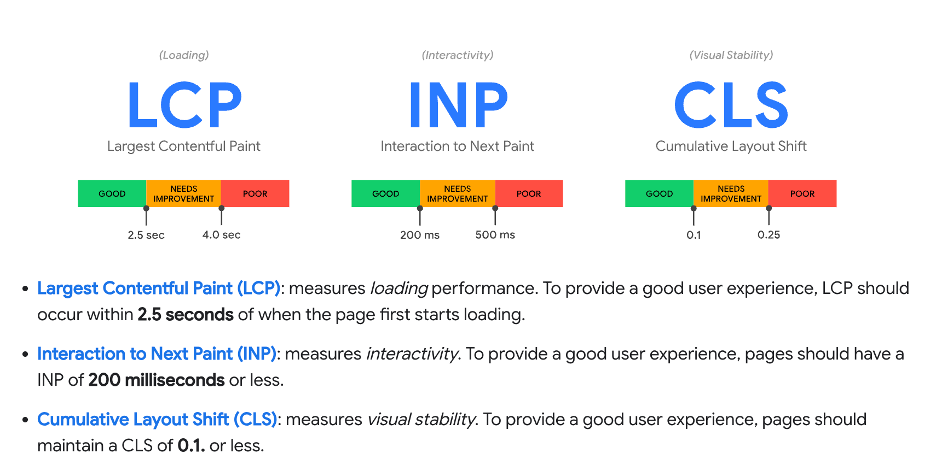
The three Core Web Vitals and their thresholds. Source: web.dev, Google. Licensed CC BY 4.0.
We anchored the engagement on Core Web Vitals, Google's metrics for what customers actually perceive: how quickly the main content loads (Largest Contentful Paint, or LCP), how much the layout shifts while the page loads (Cumulative Layout Shift, or CLS), and how quickly the page responds to interaction (Interaction to Next Paint, or INP).
These are not abstract lab scores. They are measurements of real customer experience, and improving them is, for practical purposes, improving the website.
A fair question is whether these metrics still matter as agentic browsing gains ground. They do. Google's own guidance on making sites work well for agents includes this recommendation:
“Reduce layout shifts to ensure that agents can reliably interact with your UI…”
(Source: Lighthouse agentic browsing scoring, Chrome for Developers)
A site that is fast and stable for customers turns out to be legible and actionable for agents as well. The fundamentals carry over.
How We Measured Performance
We built New Relic dashboards tracking Core Web Vitals across the site's page types (home, category, product, checkout) and segmented by device type. Real User Monitoring (RUM) data was the basis for everything that follows: unlike a one-off lab test, it reflects what actual customers experience across devices, geographies, and network conditions.
All measurements were taken as 75th percentile values, segmented by device, per Google's recommended methodology. A metric passes when its p75 value meets the “good” threshold: LCP within 2.5 seconds, CLS below 0.1, INP under 200 milliseconds. We use p75 rather than averages because averages hide the slow tail. A site can look fine on average while a quarter of its customers have a poor experience.
The baseline told a clear story. INP was comfortably in the green across the site. CLS and LCP showed opportunity for improvement. Breaking the results down by page type showed where the problems concentrated, and let Kravet decide (based on traffic and business impact) which pages to target first. Recommendations were delivered in a report, prioritized high to low.
Category pages were prioritized, so I will use them as the running example.
What We Found
Some issues were specific to individual page types, but these were the key findings for each metric.
Cumulative Layout Shift (CLS)
Images missing explicit height and width attributes. Without explicit dimensions, the browser cannot reserve space before an image loads, so content below it jumps. Adding the correct dimensions for each image resolved this. Google's guidance on optimizing CLS covers the pattern well.
Layout shifts on category listing pages caused by product data loading client-side. Kravet uses Algolia InstantSearch, which pulls product data in after the initial render. Rather than fight the architecture, we introduced a skeleton loader: it reserves the layout space up front and is replaced by the actual product content once Algolia responds, eliminating the shift entirely.
Largest Contentful Paint (LCP)
Render-blocking resources delaying page load. The fix varies per resource; several were offloaded or deferred. The most prominent offender was the main styles.css itself, which was render-blocking across the entire site. Adobe Commerce's built-in critical path CSS functionality let us inline the above-the-fold styles and defer the full stylesheet, unblocking first paint sitewide.
Lazy loading and eager loading best practices. Below-the-fold images should use browser-level lazy loading (loading="lazy"), while the LCP image should be loaded eagerly and prioritized (for example with fetchpriority="high"). Lazy-loading the hero image is one of the most common self-inflicted LCP regressions we see.
Not serving device-specific images. A single large image was being served to every viewport. Moving to the picture element lets the browser download the most appropriate asset for the viewer's display, saving bandwidth and speeding page loads on mobile.
Higher backend response times on product listing pages. Server response time sets the floor for LCP. Since Kravet was already running Algolia for search, serving category pages as Algolia landing pages took Magento's server-side rendering out of the critical path, removing the bottleneck for these pages.
Results
The recommendations were implemented and released. Reviewing one month of post-release RUM data in New Relic, both the overall site and the targeted page types moved into the green against Google's thresholds.
Performance Is Not a One-Time Project
AI-assisted development means features ship faster than ever, and web performance can regress without anyone noticing. Continuous monitoring is what turns performance from something you firefight into something you manage: every release's impact is visible, and the trends tell you where to look next.
It is also worth knowing the limits of your stack. Not every metric can be optimized indefinitely on every platform, and part of the discipline is recognizing when you have hit that point, so effort goes where it can actually make a difference.
Aysnd works with large Adobe Commerce implementations, helping clients measure, tune, and continuously monitor storefront performance. If you are not sure where your site stands, a baseline is the place to start. Talk with us ›